
No Body No Problem Controls and Keybinds
No Body No Problem controls: 1-5 select hand, knife, gun, handcuffs, and UV light; G drops, H grabs the radio, V talks, B emotes, and hold to cuff.
Quick answer: The confirmed No Body No Problem controls are the five item slots (1 hand, 2 knife, 3 gun, 4 handcuffs, 5 UV flashlight), G to drop, H to grab or drop the radio, V for talk, B for emotes, R for the middle finger, and the mouse button for ping. Handcuffing is a two-second hold. The full movement and sprint bindings are not published as a single official list, so check the in-game settings on launch day.
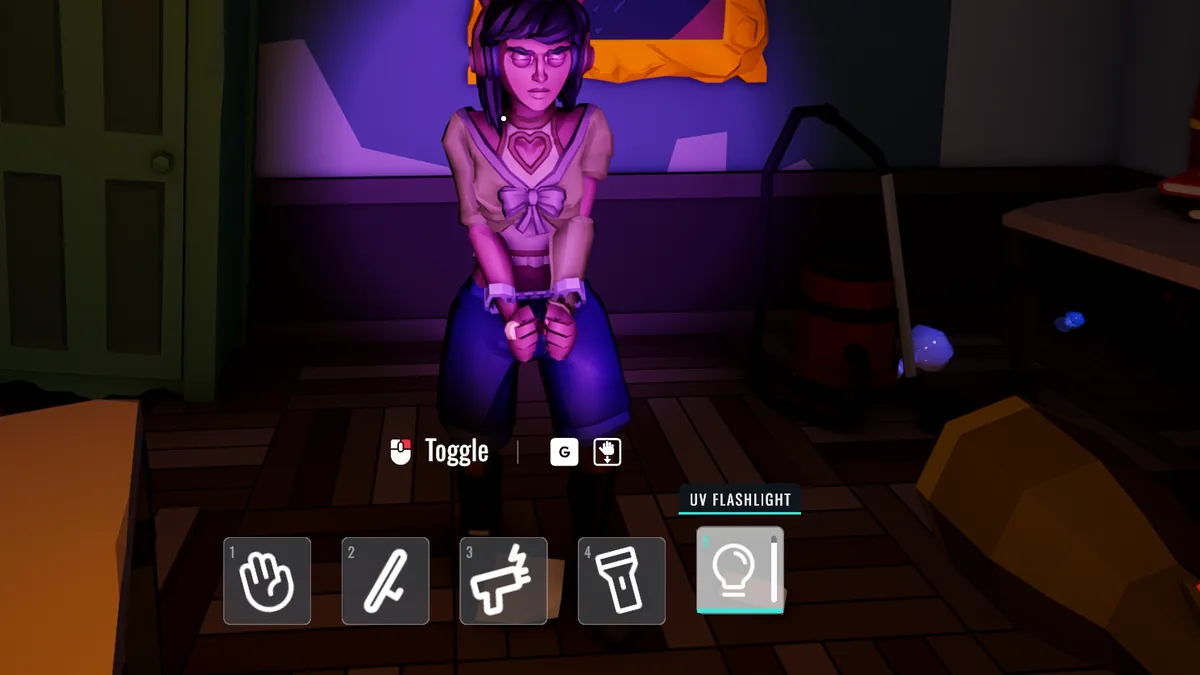
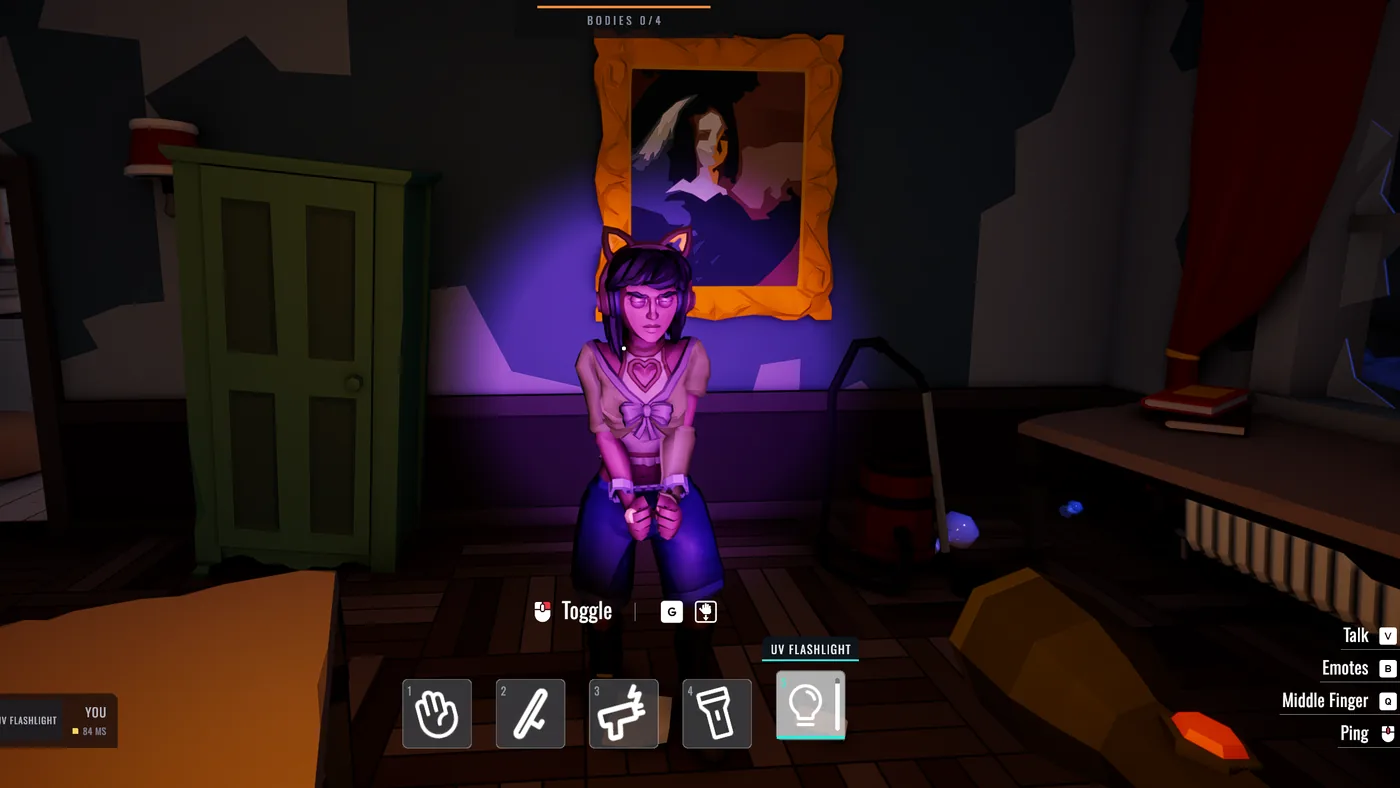
The controls are split between two roles. Suspects use the item bar to carry and clean; the cop uses the same bar for tools and restraints. The HUD screenshot from the Hand Cuffing Update is the best official reference because it shows the slots and the prompts together.
The confirmed bindings
This table only includes inputs that appear in official material or the HUD screenshot.
| Input | Action | Notes |
|---|---|---|
| 1 | Hand | Slap and basic interaction |
| 2 | Knife | Lethal tool |
| 3 | Gun | Lethal tool |
| 4 | Handcuffs | Hold to cuff |
| 5 | UV flashlight | Reveals residue |
| G | Drop | Drops the held item |
| H | Radio | Pick up or drop the radio |
| V | Talk | Voice or talk prompt |
| B | Emotes | Emote menu |
| R | Middle finger | Taunt |
| Mouse | Ping | Location ping |
| Hold 4 | Cuff | Two-second hold |
The two-second cuff is from the October 17 patch notes. The same notes say a cuffed suspect is slowed for 20 seconds and cannot use items or carry a body. A downed suspect can be cuffed, and a cop can cuff another cop for 5 seconds.
What is not confirmed
The game does not publish a full keybind page in its store material. Movement, sprint, crouch, jump, interact, and the controller layout are not listed as an official table. The Steam page does list full controller support and DualShock/DualSense compatibility on PC, so a gamepad is supported, but the exact pad mapping is unknown.
That matters for two actions:
- Crouching to use the syringe. The patch notes say the syringe requires crouching and pointing the needle at the body. The crouch key is not listed.
- Carrying a body. The interact prompt is likely the same hand slot or a hold prompt, but the exact input is not documented in the patch notes.
Do not remap blindly on day one. Load the settings, check the prompts in the first minute of a private lobby, and write down the two or three keys you actually use.
You do not need the whole keyboard on day one. Learn 1-5, G, H, and the ping. Those cover carrying, dropping, radio, and communication.
Suspect controls in practice
A suspect spends most of the round in three states: moving, carrying, and cleaning.
Moving. The item bar should be on hand or empty. You move faster and interact with doors and objects without accidentally swinging a knife.
Carrying. The body is a physical object. The prompt to pick it up appears when you are close and facing it. Once you are carrying, the body blocks your view and collides with furniture. Drop it with G if you get stuck, reposition, and pick it up again.
Cleaning. The cleaning tool is not documented in the store material, but the game tracks cleaned surfaces as a clue. Switch to the relevant item, use it on the evidence, and watch the floor rather than the cop.
The hide body strategy→ and clean evidence→ pages cover the decisions behind those inputs.
Cop controls in practice
The cop's bar is a toolkit, not a loadout. Each slot answers a different question.
- 5 (UV) answers "is there residue here?"
- 4 (cuffs) answers "can I stop this suspect from moving or carrying?"
- 2 or 3 answers "can I end this chase?" but not "where is the body?"
- 1 (hand) is the default interaction and slap.
The cop also has the radio and siren. The patch notes say the radio is picked up with H and dropped with G, and that the siren is switched with 1-4 while holding the radio. The siren can be heard from 150 meters. Use it to pressure suspects, not to announce your own position for no reason.
Controller support
Full controller support is listed on Steam, and the store page names DualShock and DualSense compatibility. That means the game should recognize a PlayStation-style pad on PC. It does not confirm adaptive triggers, haptics, or a specific button layout.
If you play on a controller, expect the same five-slot structure mapped to a radial or bumper menu. Test the cuff hold and the drop input first, because those are the two actions that cost a round when they fail.
Settings to change before your first match
- Mouse sensitivity. The game is third-person and close-quarters; a very high sensitivity makes body carrying worse.
- Voice chat. Set push-to-talk or voice activation before the round starts.
- Ping key. Confirm the mouse ping works; it is faster than describing a room.
- Controller vibration. Turn it off if it makes the camera shake during carrying.
The official material does not publish every key. A list that claims a full keyboard map without a source is guessing, and a wrong crouch key can cost you the syringe.
Official source: No Body No Problem on Steam ↗
Official source: Hand Cuffing Update patch notes ↗
Official source: PlayStation Store concept page ↗
FAQ
What is the cuff key in No Body No Problem?
Handcuffs are slot 4. Cuffing is a two-second hold, according to the October 2026 patch notes.
How do you drop an item?
Press G. The HUD shows G as the drop prompt, and the patch notes use G for dropping the radio.
How do you use the UV flashlight?
Select slot 5. The UV light is the fifth item in the cop's HUD bar.
Does No Body No Problem support controllers?
Yes. Steam lists full controller support and DualShock/DualSense compatibility on PC.
What is the talk key?
V is the talk prompt in the HUD. B opens emotes, and R performs the middle finger taunt.
More No Body No Problem Wiki Guides
No Body No Problem Clean Evidence Guide
How to clean evidence in No Body No Problem: work backward from the body, clean the carry route, avoid the fresh-patch tell, and leave the room looking normal.
No Body No Problem Co-Op: Friends and Private Lobbies
No Body No Problem co-op is online four-player play with three suspects working together against one cop. Private codes and role rotation help a group.
No Body No Problem Cop Guide
How to play the cop in No Body No Problem: search the edges, read doors and clean patches, use the UV light and cuffs, and pressure suspects without guessing.
No Body No Problem Demo: What Happened
A free No Body No Problem demo was announced on October 16, 2026, but its Steam page is not reliably visible now. Here is what the demo showed and how to check.
No Body No Problem Gameplay Explained
No Body No Problem gameplay is physics-based social stealth for four players: three suspects hide a body while one cop reads the scene. Here is the loop.
No Body No Problem Hide Body Strategy
A practical No Body No Problem hide body strategy: scout the route, pick the container, carry in short legs, clean the trail, and keep a fallback spot.
No Body No Problem Hiding Spots by Map
The best No Body No Problem hiding spots by location: apartment closets, shop shelves, car park vehicles, and the suburban grill, shed, bushes, and pool area.
No Body No Problem Hiding Spots Tier List
A No Body No Problem hiding spots tier list: shed and stockroom lead, car trunks and closets are solid, while the grill, bushes, and pool are risky decoys.