
No Body No Problem Police Timer: Arrival Countdown
No Body No Problem police timer explained: the suspect HUD countdown, the 30-second station delay, 30-second drive, and how the lobby timer opens the door.
Quick answer: The No Body No Problem police timer is the countdown on the suspect HUD, shown as "OOPS... COPS IN" plus a time. The October 2026 patch notes describe a two-stage arrival: 30 seconds before the police leave, then 30 seconds on the road, after which the police arrive by car. The lobby timer controls when the door opens. Treat the last minute as the point where you stop optimizing and start leaving.
The timer is the game's pressure system. It turns a sandbox of hiding spots into a decision with a deadline. Understanding the stages helps a team stop arguing and commit.
What the HUD shows
The suspect HUD shows a countdown in minutes and seconds. The screenshots show values such as "OOPS... COPS IN 02:11" and "OOPS... COPS IN 00:15." The cop HUD shows a separate timer and a body count.
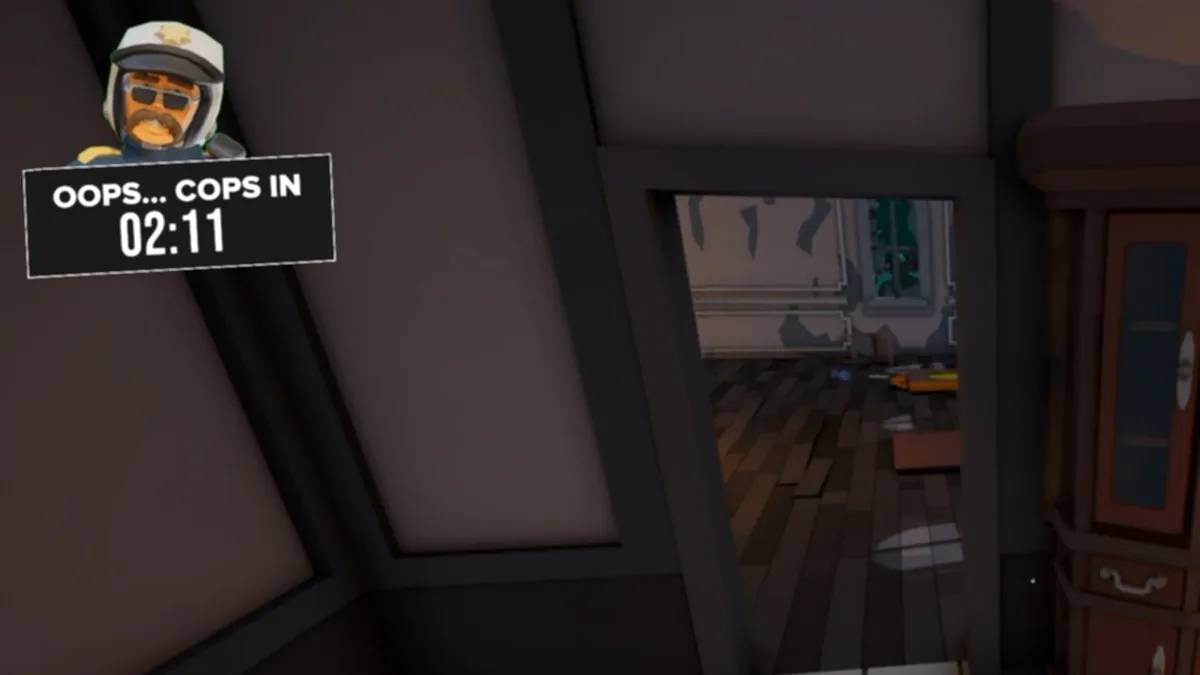
The countdown is not a wall clock for the whole round. It is the police pressure clock. When it reaches zero, the arrival sequence begins.
The two-stage arrival
The patch notes describe the sequence in two parts:
| Stage | Duration | What happens |
|---|---|---|
| Station delay | 30 seconds | The police prepare to respond |
| Drive | 30 seconds | The police travel to the location |
| Arrival | After both | The police car reaches the scene |
That is roughly one minute from the end of the countdown to the police physically arriving. The exact behavior can change between builds, so treat the 30 + 30 as the documented pattern rather than a frame-perfect rule.
The lobby timer is a separate control. The patch notes say the door opens according to the lobby timer. That means the host's settings can change the pace of the round, not just the police arrival.
What suspects should do at each stage
Early countdown (2:00+): scout, pick a container, move the body. Do not clean yet; you do not know which route you will use.
Mid countdown (1:00–2:00): body in the container, trail cleaned, suspects spread out. This is the window to fix mistakes.
Late countdown (under 1:00): stop cleaning, leave the body's room, and establish a normal position. The cop is about to have more freedom to search.
Arrival: the police car is at the scene. The suspects should already be done. Any movement now is a clue.
A body halfway across the room at 15 seconds is worse than a body in a mediocre container. Commit to the spot you have.
Why the timer matters for the cop
The cop benefits from the timer too. The suspects are under pressure, and pressure creates mistakes: a door left open, a suspect moving too fast, a cleaner who forgets the trail.
The cop should use the early minutes to establish a search route, not to chase the first noise. By the time the timer is low, the cop should have a short list of rooms to re-check.
The cop guide→ covers the search pattern, and this page is the clock that shapes it.
The siren and the radio
The radio is picked up with H and dropped with G. While holding it, the siren is switched with 1-4. The patch notes say the siren can be heard from 150 meters.
That range is large enough to change suspect behavior across the map. A siren is not just flavor; it is a pressure tool that can make a suspect run, drop an item, or abandon a carry. The cop should use it when the suspects are close to a decision, not constantly.
Common timer mistakes
- Watching the clock instead of the room. The timer is a decision aid, not a strategy.
- Cleaning until zero. A suspect caught cleaning at arrival is a confession.
- Starting a long carry late. The body is heavy; the last minute is not the time to cross the map.
- Ignoring the lobby timer. The host's setting changes the door timing, so ask before the round.
- Assuming the timer is the whole round. The arrival sequence adds roughly a minute after the countdown.
A simple timer plan
For a first session, use this plan:
- 2:00+: pick the container and move the body.
- 1:30: clean the trail.
- 1:00: fix furniture and spread out.
- 0:30: stop cleaning; establish a normal position.
- 0:00: be somewhere plausible, away from the body.
The exact numbers depend on the lobby, but the shape is right: hide, clean, reset, wait.
When the group cannot agree, the clock decides. At 1:00, the carrier picks the nearest viable spot and the cleaner follows. A mediocre plan executed on time beats a perfect plan executed late.
Official source: Hand Cuffing Update patch notes ↗
Official source: No Body No Problem on Steam ↗
Official source: PlayStation Store concept page ↗
FAQ
What does the police timer mean in No Body No Problem?
It is the countdown before the police pressure arrives. The suspect HUD shows it as "OOPS... COPS IN" plus a time.
How long after the timer do the police arrive?
The patch notes describe 30 seconds at the station and 30 seconds on the road, so roughly one minute after the countdown ends.
Does the lobby timer change the police arrival?
The patch notes say the door opens according to the lobby timer. The host's settings can change the pace of the round.
What should suspects do at 30 seconds?
Stop cleaning, move away from the body, and establish a normal position. The arrival is not the time to start a new carry.
Can the cop hear the siren?
The siren is a police tool, and the patch notes say it can be heard from 150 meters. It pressures suspects rather than helping them.
More No Body No Problem Wiki Guides
No Body No Problem Clean Evidence Guide
How to clean evidence in No Body No Problem: work backward from the body, clean the carry route, avoid the fresh-patch tell, and leave the room looking normal.
No Body No Problem Co-Op: Friends and Private Lobbies
No Body No Problem co-op is online four-player play with three suspects working together against one cop. Private codes and role rotation help a group.
No Body No Problem Controls and Keybinds
No Body No Problem controls: 1-5 select hand, knife, gun, handcuffs, and UV light; G drops, H grabs the radio, V talks, B emotes, and hold to cuff.
No Body No Problem Cop Guide
How to play the cop in No Body No Problem: search the edges, read doors and clean patches, use the UV light and cuffs, and pressure suspects without guessing.
No Body No Problem Demo: What Happened
A free No Body No Problem demo was announced on October 16, 2026, but its Steam page is not reliably visible now. Here is what the demo showed and how to check.
No Body No Problem Gameplay Explained
No Body No Problem gameplay is physics-based social stealth for four players: three suspects hide a body while one cop reads the scene. Here is the loop.
No Body No Problem Hide Body Strategy
A practical No Body No Problem hide body strategy: scout the route, pick the container, carry in short legs, clean the trail, and keep a fallback spot.
No Body No Problem Hiding Spots by Map
The best No Body No Problem hiding spots by location: apartment closets, shop shelves, car park vehicles, and the suburban grill, shed, bushes, and pool area.